Process Mapping Steps for Basic EHR Workflows
Key Facts
- U.S. physicians rate their EHRs 45.9 out of 100 on usability, the bottom 9% of all software, according to peer-reviewed research.
- Clinicians spend one-third to one-half of their workday in EHRs, costing over $140 billion in lost care capacity annually, per a scoping review.
- Each one-point drop in EHR usability correlates with a 3% increase in physician burnout risk, the review found.
- 96% of U.S. acute-care hospitals and 78% of office-based physicians now use an EHR, the same research shows.
- Hospitals starting with high-volume workflows like claims and intake see measurable savings within 6–12 months, healthcare automation research reports.
- 92% of revenue cycle leaders now list AI automation as a top priority, industry data shows.
- Cedars-Sinai's CS Connect program automated patient intake inside its EHR and now serves more than 42,000 patients, as documented in implementation research.
Hire a team member that works 24/7 — for less than a part-time wage.
AI receptionists, SDRs, dispatchers and 99+ roles. Trained on your business, fully managed.
Not sure where to start? Ask our AI planner
The EHR Productivity Paradox: Why Digitized Workflows Still Burn Out Clinicians
Digitizing medicine was supposed to give clinicians their time back. Instead, many now spend more of their day typing than treating.
The numbers tell a stark story. According to a peer-reviewed scoping review, 96% of nonfederal acute-care hospitals and 78% of office-based physicians in the U.S. now use an EHR. Yet those same clinicians spend an estimated one-third to one-half of their workday interacting with the system, chart review, order entry, and inbox management consume the most time. That lost clinical capacity is valued at over $140 billion annually.
The usability picture is even more damning. U.S. physicians rate their EHRs a median System Usability Scale score of 45.9 out of 100, the bottom 9% of all software tested. And the review found a direct human cost: each one-point drop in usability correlates with a 3% increase in burnout risk. One physician quoted by Sermo put it bluntly: the EHR "converted physicians into data entry workers."
The root cause isn't the technology itself, it's how it was implemented. As implementation experts have warned, organizations too often "simply hardwire existing workflows into the EHR without any thought as to are these workflows truly the best way to perform a given task." Once bad workflows are baked in, reconfiguring the software becomes prohibitively costly.
The consequences of skipping process mapping show up everywhere in a practice:
- Lost time, clinicians lose hours daily to documentation tasks that a mapped, optimized workflow could streamline or eliminate.
- Higher burnout and turnover, usability-driven frustration pushes experienced staff out, compounding existing shortages.
- Wasted spend, administrative costs already consume 15–30% of U.S. healthcare spending, and inefficient workflows inflate that share.
- Costly rework, retrofitting a misconfigured EHR after go-live costs far more than mapping workflows upfront.
The fix isn't another software purchase. It's mapping workflows before digitizing them, understanding how intake, billing, and follow-ups actually operate, eliminating steps that add no value, and letting clinicians lead the design. That's the approach AIQ Labs applies when rebuilding a practice's costliest workflow as an automated, owned system: map first, eliminate second, automate third.
The paradox resolves once you see it clearly: EHRs didn't fail because they're digital. They fail when they digitize broken processes at speed. Process mapping is the step that changes the outcome.
Map Before You Automate: The Four-Step Process Mapping Method
The most expensive EHR mistake isn't choosing the wrong software, it's digitizing a broken workflow before anyone questions whether it should exist in the first place. As workflow expert John Moore warned, organizations that hardwire existing processes into an EHR typically regret it, and reconfiguring the software afterward is too costly to reverse.
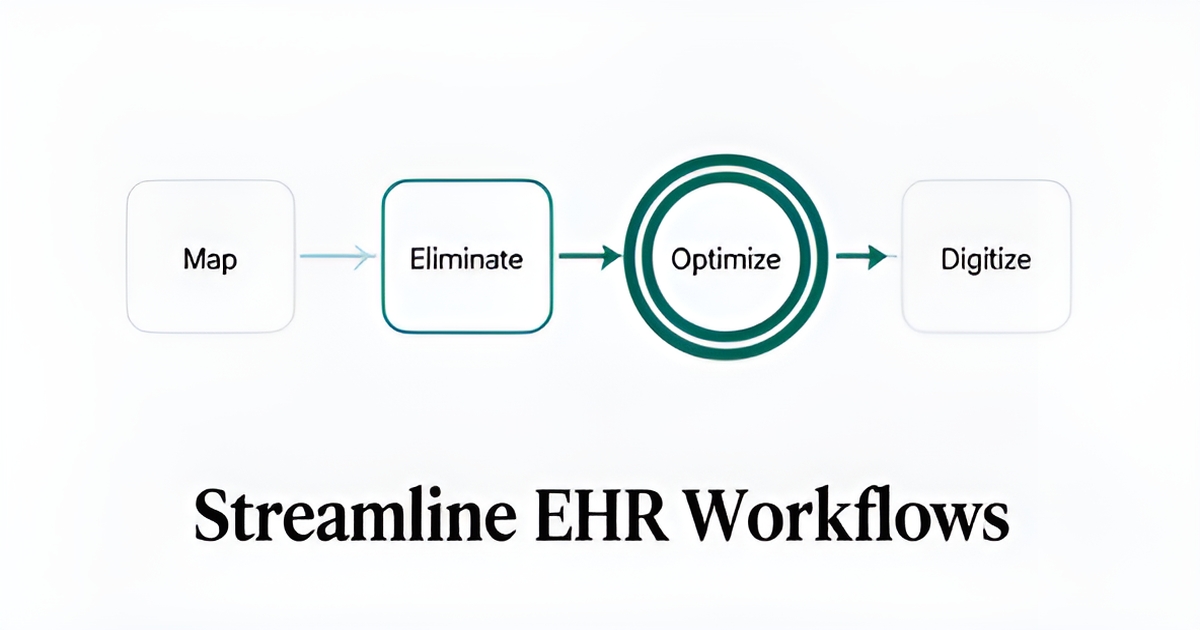
That's why the sequence matters. Process mapping works best as a four-step discipline:
- Map the current state. Before touching any system, document how intake, billing, and follow-ups actually operate today, not how a policy manual says they should. Each department lays out its standard procedures, step by step.
- Eliminate first. Don't automate what shouldn't survive. Experts advise taking a critical look at which processes can be eliminated altogether rather than simply converting paper steps into digital ones.
- Optimize what remains. Restructure the surviving steps around how care is actually delivered. An EHR workflow is not a digitized version of paper processes, it's a fundamentally restructured approach.
- Digitize last. Only once the workflow is lean should it be built into the system, with automation embedded via APIs rather than bolted on as a separate tool.
One rule underpins all four steps: clinicians must lead workflow definition, not IT. IT's role is to implement what end users define. This matters because the stakes are measurable, U.S. physicians rate their EHRs a median usability score of 45.9 out of 100, placing them in the bottom 9% of all software, and each one-point drop correlates with a 3% increase in burnout risk, according to a peer-reviewed review of EHR usability.
The cost of skipping this discipline shows up in the numbers. Clinicians spend an estimated one-third to one-half of their workday inside EHR systems, more than $140 billion in lost care capacity annually, largely because workflows were misaligned with clinical reality from day one.
The payoff for getting it right is equally concrete. Practices that start with targeted, high-volume, document-heavy workflows, claims, prior authorizations, patient intake, typically see measurable savings within 6 to 12 months, per healthcare automation research.
This is the approach AIQ Labs applies when rebuilding a single high-cost workflow like intake or scheduling: map and fix the process first, then digitize it as an owned, AI-driven system delivered in phases, so you're never paying to automate waste.
The Five-Stage EHR Workflow Mapping Template
Most practices don't fail at EHR adoption because the software is bad, they fail because they never mapped the clinical encounter before digitizing it. A staged template gives you that map, and it starts with the five stages every patient journey shares.
The scaffold follows the clinical encounter as described in EHR workflow research: Pre-Visit Prep, Check-In, Clinical Assessment, Diagnosis & Orders, and Treatment & Documentation. Each stage carries predictable tasks you can list, time, and evaluate for automation.
Pre-Visit Prep covers appointment reminders, intake form distribution, and insurance verification. Check-In includes patient arrival, form collection, copay processing, and vitals entry. Clinical Assessment covers history review and examination documentation. Diagnosis & Orders involves CPOE, computerized provider order entry, for labs, imaging, and prescriptions. Treatment & Documentation closes the loop with note completion, patient instructions, and follow-up scheduling.
- Pre-Visit Prep: reminders, digital intake forms, insurance verification
- Check-In: arrival confirmation, form capture, vitals entry
- Clinical Assessment: chart review, history, exam documentation
- Diagnosis & Orders: CPOE for medications, labs, imaging
- Treatment & Documentation: note completion, instructions, follow-ups
Where do automation candidates hide? Not evenly across the five stages. A peer-reviewed scoping review found the most time-intensive EHR activities are chart review, order entry, and inbox management, with clinicians spending an estimated one-third to one-half of their workday in the EHR, over $140 billion in lost care capacity annually (Journal of Evaluation in Clinical Practice). That concentrates your automation opportunity in stages three through five.
The practical sequencing advice from implementation research is to start with document-heavy, high-volume workflows, claims, prior authorizations, intake, before touching clinical operations. Most hospitals see measurable savings within 6–12 months when they start there. Cedars-Sinai's CS Connect program, which automated patient intake inside its EHR, now serves more than 42,000 patients.
When you map each stage, embed automation through HL7 or FHIR APIs rather than replacing systems, and add context filters so automation triggers only in relevant situations. This is the same approach AIQ Labs takes with its AI Workflow Builds: rebuild the single workflow that costs the most, intake, scheduling, or documentation, in phases, so clinicians keep their existing EHR while the heavy lifting moves to AI. One process, mapped once, fixed for good.
Where to Start: High-Volume, Document-Heavy Workflows First
When practices begin automating EHR workflows, the instinct is often to tackle clinical documentation first. That's the wrong starting point. The fastest, most reliable returns come from the boring, repetitive, document-heavy work that consumes administrative staff hours every single day: claims processing, prior authorizations, appeals, and data reconciliation.
Why start here? Because these workflows are high-volume and predictable, which makes them ideal candidates for automation, and because the results show up quickly. Most hospitals that begin with high-volume workflows like claims or documentation see measurable savings within 6–12 months, according to healthcare automation research. It's no surprise that 92% of revenue cycle leaders now list AI automation as a top priority. Starting with a targeted, high-impact area also builds internal confidence before you expand into more complex clinical operations.
Once you've picked the right workflow, the next decision is how the automation actually connects to your EHR. The answer, increasingly, is through APIs, not system replacement. Modern automation platforms act as orchestration layers that sit on top of existing systems like Epic, Cerner, and your scheduling or financial tools. The recommended approach is to embed automation inside existing EHR workflows using HL7 or FHIR APIs, so staff never have to leave the system they already know.
That last point matters more than it might seem. U.S. physicians already rate their EHRs a median 45.9 out of 100 on the System Usability Scale, placing them in the bottom 9% of all software, and each one-point drop in that score correlates with a 3% increase in burnout risk, per a peer-reviewed scoping review. Adding yet another interface for clinicians to learn is a proven adoption killer.
To avoid that trap, build these safeguards into your mapping from day one:
- Use context filters so automation triggers only in relevant situations, rather than firing on every event in the EHR.
- Capture clinician feedback continuously and use it to fine-tune when and how automation activates.
- Keep humans in the loop for exceptions and escalations, so nothing critical happens without oversight.
- Validate every automated action before execution, with complete audit trails for compliance review.
This is exactly how AIQ Labs approaches workflow builds: rather than replacing your EHR, we rebuild the single workflow that costs the most, intake, claims follow-up, scheduling, as an owned, AI-driven system delivered in phases, with deep two-way API integration into the tools you already run. Clients approve each phase as it ships and keep everything built along the way.
The sequencing principle is simple: prove value where the volume is highest and the work is most repetitive, then let those early wins fund and justify the next phase of automation.
From Map to Live System: Training, Adoption, and Phased Delivery
A finished map is not a finished implementation. The most carefully digitized workflow in the world fails if the people running it every day were trained in a rush, consulted late, or left without support when the system went live.
That risk is real in healthcare. U.S. physicians rate their EHRs a median System Usability Scale score of 45.9 out of 100, the bottom 9% of all software, and peer-reviewed research links every one-point drop to a 3% increase in burnout risk. Training and adoption work is how you keep your newly digitized workflow from joining that statistic.
Role-based training matters more than feature training. Sermo's implementation guidance recommends training each role on its own tasks, front desk staff on intake and scheduling, clinicians on order entry and documentation, rather than walking everyone through every screen. It also recommends cultivating super users: early adopters who test the system, shape templates and shortcuts, and become the first line of peer support. Colleagues answering questions at the desk reduce resistance in a way no helpdesk ticket can.
Cutting the training budget is a documented mistake. Implementation experts warn that skimping on one-on-one training leads directly to productivity drops and burnout, the exact outcomes your mapping work was supposed to prevent. Treat training as part of the build, not an optional line item.
After go-live, monitoring keeps the workflow improving rather than degrading. Track the metrics that reveal whether the digitized process is actually working:
- Throughput, how many intake forms, claims, or prior authorizations move through per day compared to the paper era
- Error rates, rework, duplicate entries, and correction volume at each workflow stage
- User satisfaction, clinician and staff feedback, captured continuously so triggers and templates can be fine-tuned
- Productivity, time per task against the baseline you recorded during current-state mapping
This is where phased delivery earns its keep. Rather than a single big-bang launch, ship the workflow in stages, approve each phase, measure it, adjust, then continue. AIQ Labs structures its workflow builds exactly this way under its Build in Milestones model: one workflow split into phases, each approved before the next begins, with everything built so far kept even if you stop. You get early visible wins on high-volume tasks, which research shows typically produce measurable savings within 6–12 months.
If you want a second pair of eyes on which workflow to digitize first, start with the two-minute Fit Check at aiqlabs.ai/apply, then book a free 30-minute strategy call at aiqlabs.ai/book. It's a working session to map your biggest bottleneck, and if there isn't a clear win, we'll tell you that too.
Still paying for 10+ subscriptions that don’t talk to each other?
We build custom AI systems you own outright. No vendor lock-in. Full control.
Not sure where to start? Ask our AI planner
Frequently Asked Questions
Why do I need to map workflows before digitizing them in an EHR?
How much time do clinicians actually spend in the EHR?
What are the basic steps of process mapping for an EHR workflow?
Which EHR workflows should I automate first?
Do I have to replace my EHR to add automation?
How do I structure the patient journey when mapping EHR workflows?
The Map Is the Medicine: Fix the Workflow Before You Digitize It
The throughline of everything above is simple: EHRs fail when they digitize broken processes at speed. The fix is a discipline, not a purchase, map the current state, eliminate what shouldn't survive, optimize what remains, and only then digitize, with clinicians leading the definition. Start where the volume is highest and the work is most repetitive: claims, prior authorizations, intake. That's where implementation research shows measurable savings within 6–12 months. Then protect the win with role-based training, super users, and post-go-live monitoring of throughput, error rates, and satisfaction. Your next step is small: pick your single costliest workflow and sketch its five stages on one page. If you want a second pair of eyes, AIQ Labs rebuilds one high-cost workflow at a time as an owned, phased system, start with the two-minute Fit Check at aiqlabs.ai/apply, then book a free 30-minute strategy call at aiqlabs.ai/book. If there isn't a clear win, we'll tell you that too.
Make AI your competitive advantage — not just another tool.
Strategy, implementation and ongoing optimization. One partner, end to end.
Not sure where to start? Ask our AI planner