From Hand-Drawn Blueprints to AI-Generated 3D Models: How Woodworking Studios Can Modernize Design
Key Facts
- Licensed design professionals typically spend the majority of their time on repetitive technical drafting rather than design innovation according to Blueprints AI
- AI-powered 3D rendering can meaningfully shorten project approval cycles, with firms reporting faster turnaround compared to traditional workflows per STEDAXIS research
- TechDraw AI offers a photo-to-DXF workflow with strong user ratings for extracting measurements from images as reported by TechDraw AI
- WOODPLANS.AI offers 100+ ready-to-build designs and free starter plans with no credit card required based on platform data
- AI-driven nesting and layout optimization reduces scrap, saves money, and improves yield from each sheet Toolstoday highlights
- Treat early AI images as inspiration—not instructions, because pretty renderings can hide impossible joinery or nonsensical dimensions advised by Toolstoday
Hire a team member that works 24/7 — for less than a part-time wage.
AI receptionists, SDRs, dispatchers and 99+ roles. Trained on your business, fully managed.
Not sure where to start? Ask our AI planner
The Drafting Problem: Why Design Bottlenecks Kill Woodworking Studio Growth
Every woodworking studio owner knows the feeling: a custom furniture project stalls not because the joinery is complex, but because the shop's most skilled designer is buried in dimensioning drawings for the third revision. According to industry analysis, licensed professionals historically spend the majority of their time on repetitive technical drafting rather than design innovation. That ratio isn't just frustrating—it's a structural bottleneck that caps revenue, delays client approvals, and forces studios to choose between craftsmanship and cash flow.
- Client approval cycles stretch from weeks to months when revisions require manual redrafting
- Skilled designers bill hours to dimensioning instead of high-value design consultation
- Cash flow gaps widen as projects stall in the "waiting for sign-off" phase
- Material waste compounds when cut lists aren't optimized before the saw touches wood
Traditional CAD workflows were supposed to solve this. Instead, they often shifted the bottleneck from the drafting table to the mouse. Recent research indicates that firms using AI-powered 3D rendering can cut project approval times substantially—often by half or more on long cycles. For architectural millwork shops, that difference determines whether a quarter closes in the black or the red.
The hidden cost isn't just time. It's the projects you never bid because your team is at capacity on documentation. It's the client who walks away after the third week of silence. It's the senior craftsman who leaves because they didn't start this career to draw title blocks.
Start the Fit Check to see how AI-powered design tools can reclaim those hours for the work that actually grows your studio. If the bottleneck runs deeper than design—into scheduling, client follow-up, or quoting—AIQ Labs' [AI Workflow Builds](/workflow-builds) rebuild the one workflow that costs you the most, at a fixed price.
Sketch-to-3D AI: Turning Napkin Drawings into Client-Ready Renderings
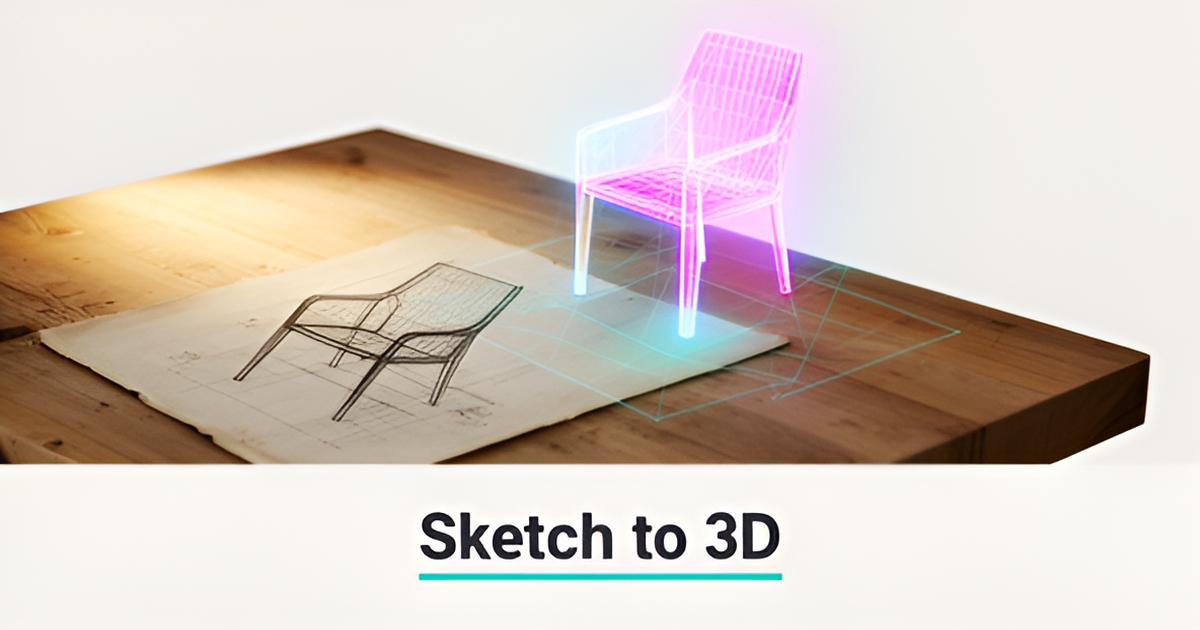
Forget waiting weeks for client approvals—modern AI tools now turn hand sketches, photos, or even text descriptions into dimensioned 2D drawings and 3D models in minutes. This sketch-to-3D AI capability is transforming how woodworking studios move from initial concept to client-ready renderings, with firms reporting significantly faster approval cycles compared to traditional workflows. STEDAXIS research indicates that AI-powered 3D rendering can cut project approval times dramatically, turning what once took many weeks into a far shorter process.
The workflow often begins with tools like TechDraw AI, which extracts precise measurements from a single photo of a part or sketch. Users upload an image, anchor one real-world dimension (like the width of a board), and receive a clean, scaled DXF file—ready for import into SketchUp Pro. Once in SketchUp, the DXF serves as a foundation: exploding the import creates native geometry, allowing designers to Push/Pull faces or use Follow Me to build 3D models quickly and accurately. This photo-to-DXF-to-3D pipeline eliminates guesswork in scaling and ensures real-world dimensions carry through the entire design process. TechDraw AI's integration with SketchUp highlights how the two tools complement each other—AI handles the measuring and drawing, while SketchUp excels at fast, intuitive 3D modeling.
What sets modern AI apart is its ability to maintain design intent through iterative changes. Unlike traditional CAD workflows that require starting from scratch, platforms like Blueprints AI preserve conversational context throughout a project. Designers can request adjustments—narrower legs, deeper mortises, altered proportions—and the AI updates the entire construction document set while retaining the original vision. This contextual memory supports rapid exploration of alternatives without losing progress, keeping the focus on craftsmanship rather than repetitive drafting. Blueprints AI emphasizes this iterative strength, noting that users can refine details, explore alternatives, and export to AutoCAD, Revit, or PDF as needed—all without rebuilding from the ground up.
For woodworking studios, this means faster client feedback cycles, fewer revision delays, and more time spent on joinery, material selection, and buildability—where human expertise truly matters. By automating the translation from napkin sketch to dimensioned model, AI becomes a true power tool in the design stage: accelerating ideation, improving visualization, and closing the gap between concept and client approval. Teams using these tools report not just faster turnarounds, but higher confidence in early-stage decisions, knowing that the AI-generated base preserves accuracy while inviting creative iteration. As one woodworker noted after using WOODPLANS.AI to turn scrap wood into a planter box plan, the speed and practicality of AI-driven design can turn even offcuts into buildable ideas—proof that modernization doesn't mean losing the soul of craftsmanship, but rather freeing it to focus on what matters most.
Beyond Visualization: AI for Material Optimization and Waste Reduction
Once the concept is visualized, the real shop economics start in the cut room. AI is moving from pretty pictures to practical material decisions that affect cost, lead time, and scrap bins.
Nesting and sheet-good layout optimization is one of the most practical AI benefits for woodworkers, helping achieve better yield from each sheet, cleaner workflow for CNC cutting, and less time rearranging parts manually. Toolstoday notes the sustainability angle directly: fewer wasted sheets means fewer reorders, less disposal, and more profit per job. Shops using AI-driven nesting report smarter layouts that reduce scrap and save money without changing the design intent.
Inventory-based project matching adds another layer of efficiency. WOODPLANS.AI lets users tell the AI what wood they have, and it picks the best project you can actually build from that inventory. The same platform performs engineering checks on dimensions, fasteners, and assembly sequence, and users report that those checks catch issues before material is committed. One woodworker noted, "The engineering checks caught a fastener length issue that would have split my wood. Worth it just for that alone."
Cut list generation becomes faster and more reliable when AI handles the first pass. Instead of manually breaking down a design, the system outputs optimized parts lists aligned to sheet sizes and tooling constraints, which can then be validated in CAD/CAM. This is where AI works best as a power tool in the design stage — accelerating the boring parts so you can spend more time on fit, finish, and craftsmanship. Toolstoday
Where human verification remains critical:
- Wood movement and grain direction, which AI cannot predict from a digital model alone
- Joinery feasibility and physical assembly logic, since a rendering can hide a joint that is impossible to assemble
- Tooling reality such as bit selection, feeds, workholding, and clearances before a toolpath is run
The most effective workflows keep AI for speed and iteration and keep the craftsperson for buildability. Treat early AI images as inspiration — not instructions, because a pretty rendering can hide dimensions that don't make structural sense. Toolstoday advises starting with one area — like concept generation or nesting — and building from there, rather than over-automating too soon.
For creative teams, this is the same shift happening in design communication more broadly. AI can turn sketches into detailed 3D renderings and design proposals, accelerating client approvals. AIQ Labs supports creative teams with managed [AI Employees](/ai-employees) that handle design communication, client follow-up, and administrative load—freeing designers to focus on the work itself. The shop benefit is the same: faster approvals and fewer material surprises when AI handles layout and cut optimization, and humans confirm the real-world constraints.
The Hybrid Workflow: Implementing AI Without Losing Craftsmanship
A thoughtful integration of AI begins not with full automation, but with using it to spark and refine ideas before any physical work starts. Woodworking studios can start by feeding rough sketches, photos, or simple text descriptions into AI tools to generate multiple design variations quickly—turning the blank page into a springboard for creativity. This approach leverages AI's strength in rapid iteration while keeping the designer firmly in control of direction and intent. Toolstoday emphasizes that AI should act as a "power tool" for the design stage, accelerating concept-to-plan without replacing the judgment needed for real joinery and material behavior.
Once a promising concept emerges, the next step is moving into traditional CAD software to refine dimensions, test assembly logic, and apply real-world constraints like wood movement, tooling clearances, and hardware specifications. This is where the risk of AI "hallucination"—generating visually plausible but structurally impossible details—must be addressed. Toolstoday warns that AI can confidently produce joints that can't be assembled or dimensions that defy structural logic, treating early outputs as inspiration rather than final instructions. Studios should validate all AI-generated geometry in CAD, cross-checking joinery feasibility and material behavior before proceeding.
Before any cut is made, the workflow concludes with a validation phase: reviewing cut lists, simulating toolpaths, and confirming assembly sequence. Some AI tools, like WOODPLANS.AI, include built-in engineering checks for fastener length and dimensional stability, catching issues that could lead to split wood or failed joints. WOODPLANS.AI users have reported that these checks prevented costly mistakes during prototyping. By positioning AI as an early-stage collaborator—handling ideation and initial drafting while reserving critical validation for human expertise—studios gain speed without sacrificing the precision craftsmanship demands. This balanced approach reduces repetitive drafting time, which historically consumes the majority of licensed professionals' effort, freeing them to focus on fit, finish, and design innovation. Blueprints AI highlights this shift as ending the era of grunt work, allowing creators to direct energy where it truly matters.
If you want to go beyond point tools and connect design, quoting, client communication, and production into one system you own outright, AIQ Labs builds [AI Operating Systems](/ai-operating-systems) in phases—so you adopt automation without disrupting the shop floor.
Still paying for 10+ subscriptions that don’t talk to each other?
We build custom AI systems you own outright. No vendor lock-in. Full control.
Not sure where to start? Ask our AI planner
Frequently Asked Questions
How much time do woodworking studios actually waste on drafting instead of design?
Can AI really speed up client approvals for custom furniture?
What's the practical workflow from a napkin sketch to a buildable model?
Will AI replace the craftsman's judgment on joinery and wood movement?
How does AI help with material waste and cut lists?
What should I watch out for with AI-generated woodworking plans?
Where Craftsmanship Meets the Future of Woodworking
From sketch to sawdust, AI is becoming the quiet power tool in the woodworking studio—not replacing the craftsman, but clearing the clutter of repetitive drafting so expertise can shine where it matters most: in joinery, material choice, and the nuanced decisions only human hands can make. By turning napkin ideas into dimensioned models in minutes, optimizing sheet layouts to cut waste, and accelerating client approvals, these tools return precious hours to the work that builds reputation and revenue. The most successful studios treat AI as a collaborator—using it to explore, iterate, and visualize—then bringing designs into CAD for real-world validation before the first cut. This hybrid approach doesn't dilute craftsmanship; it protects it from the grind of documentation, letting designers focus on innovation instead of inch-by-inch redraws. If you're ready to see where AI could unlock capacity in your workflow, start with a free two-minute Fit Check to explore where automation makes sense for your studio—no obligation, just clarity on your next best move.
Make AI your competitive advantage — not just another tool.
Strategy, implementation and ongoing optimization. One partner, end to end.
Not sure where to start? Ask our AI planner